 Lattice Suite
Free template
Free Monthly Budget Spreadsheet Template
Plan income, spending and savings, then compare your actual amounts. Includes editable example values in USD.
No account is needed to download the file. Sign in to Lattice to import it and save your own copy.
Use it in Lattice Sheets
- Download the XLSX file above.
- Sign in to Lattice Sheets and create a new blank spreadsheet.
- Choose File → Import CSV or XLSX… and select the downloaded file. Import adds a worksheet beside the current one.
- Select the imported Monthly budget sheet, replace the examples and give the spreadsheet your own name.
Make the budget yours
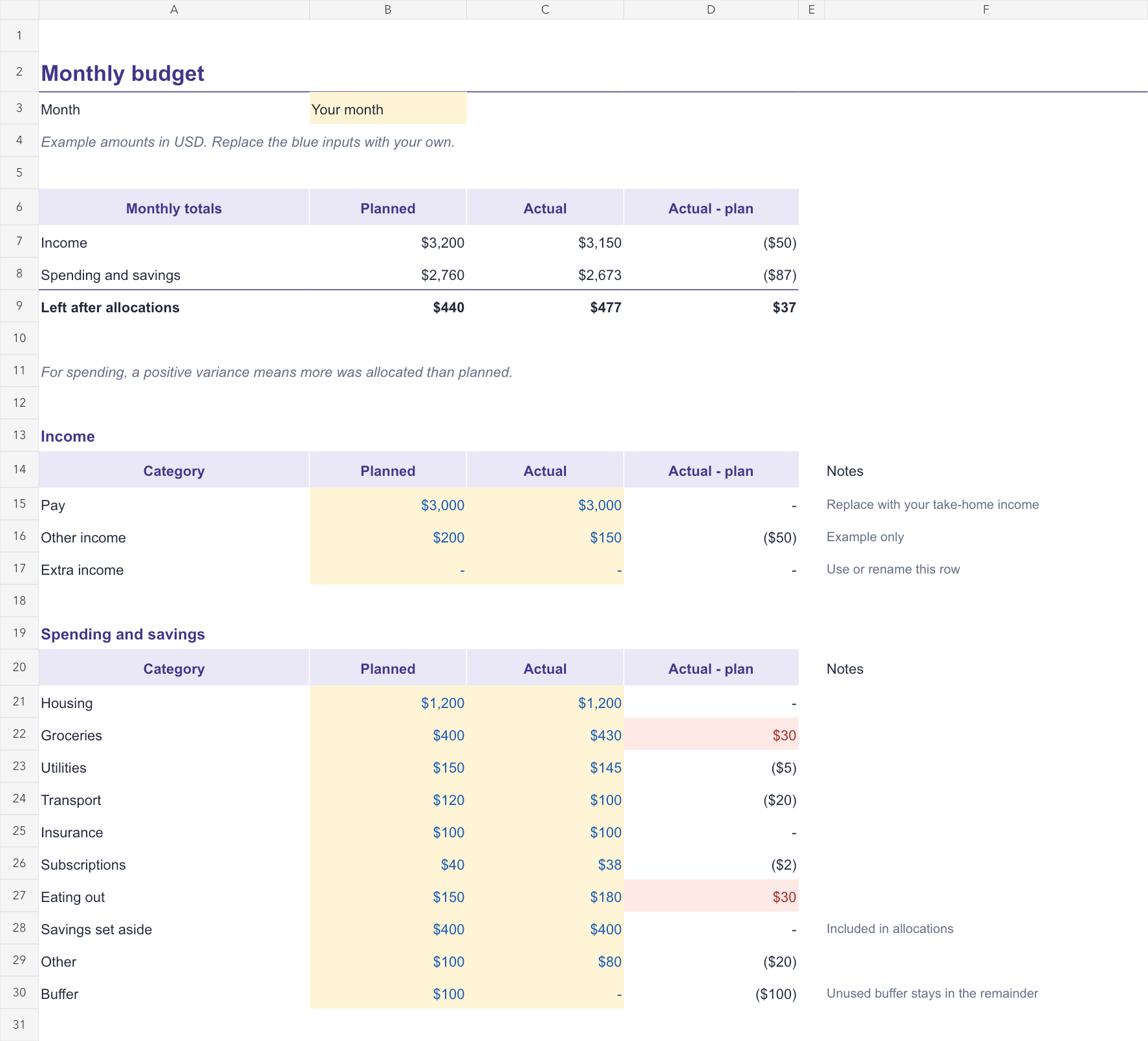
Set the month, then replace the blue Planned and Actual numbers. The examples use USD; change the number format if you use another currency. The template does not convert currencies.
Income, spending and savings feed the totals at the top. Left after allocations is income less spending and savings set aside. A positive spending variance means more was allocated than planned.
Rename the categories to suit your budget. Keep the formulas in the variance and total cells. If you add rows outside the existing sections, extend the total ranges to include them.
Template preview
Example content is included so you can see how the template works.
More starter templates
Browse all free templates or create a free Lattice account. Replace example entries before using a template for real work, and review the imported content.